One base. Several rovers.
Publish your base stream and give each rover its own credentials. Use an internet connection where a radio link is impractical.
Set up your first connection
Managed NTRIP caster hosting
Connect your own RTK base and deliver corrections to your rovers over the internet. YouCORS hosts your NTRIP caster, so you don't have to maintain a server.
3-day free trial. No credit card required.
See plans and pricingDedicated infrastructure · Static IP · Choice of data center
See the connection inspectorFrom base to field
Your base → NTRIP caster → your rovers
Utility site
RTK base
Farm
RTK base
YouCORS
Private NTRIP caster
Private streams · Individual device access
Survey rover
Excavator
Tractor
Inside YouCORS
Open a base session to check incoming traffic, inspect individual rover connections, and review events when equipment needs attention.

Swipe across the image to inspect it, or open the full-size view.
Check observed throughput and spot gaps in the session history.
Inspect each rover’s received data, connection duration and latest reported status.
Review connection events and previous sessions for the same base.
Built around your working day
A local survey team, equipment moving between sites, or a change of caster: start with the setup you already have.
Publish your base stream and give each rover its own credentials. Use an internet connection where a radio link is impractical.
Set up your first connectionOrganize base streams by project and manage access for survey rovers and compatible machinery as they move between jobs.
Explore the site setupTest one base and one rover before moving the fleet. Check your streams, device settings and access with your own equipment.
Discuss your migrationExplore your field of work
Surveying companiesConstruction & infrastructureAgriculture & fruit farmingYour streams. Your access rules.
Use your private caster for your own base streams. Give them recognizable names so operators can find the right source for the job.
Your team’s base streams
Private caster · Example setup
WEST-SITE
Earthworks team
NORTH-FIELD
Farm equipment
YARD-BASE
Survey crew
From the field
Public experiences shared by users on the Emlid Community Forum.
December 2025 → February 2026
~5
base stations
~30
machine-control systems
Looking for a replacement caster, jake_g described a UK fleet moving between job sites. After choosing YouCORS, the user reported that the fleet was working well and highlighted seeing only their own mountpoints.
Setup and outcome reported by jake_g in two public posts. Figures describe that user’s fleet, not a plan limit.
November 2019 · Setup experience
After trying several NTRIP casters, Noel Burton described YouCORS as the easiest to set up and shared a video showing his Reach RS2 configuration.
Noel Burton
Surveyor and 12d Survey trainer, as identified in the original discussion.
Read the recommendationMulti-base operations · Nearest Base
Give a rover one group name for several bases. As it sends its position, Nearest Base selects the closest eligible connected base; the connection name stays the same.
Requires periodic GGA from the rover, valid base coordinates and correction streams compatible with your receiver.
After a source change, check the rover’s RTK status. Switching does not guarantee an uninterrupted RTK fix or immediate recovery if a base disconnects.
Included with Pro, Enterprise and the trial. Requires a supported dedicated instance.
Read the Nearest Base setup guide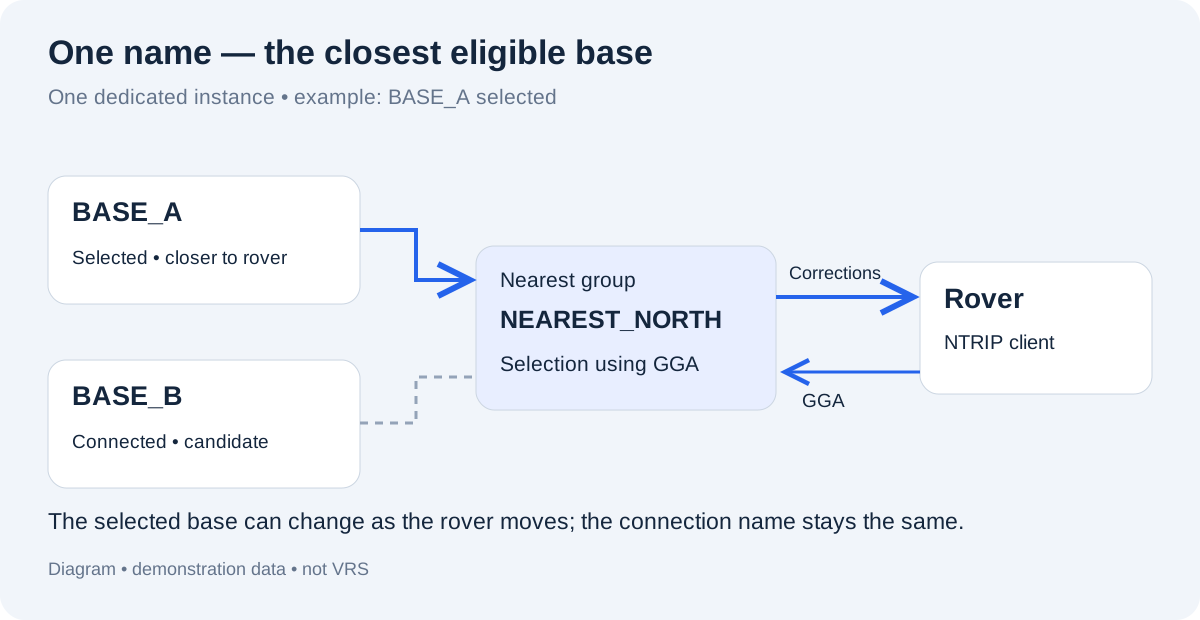
Choose a plan for your equipment
Start with the number of base streams and device credentials you need. Choose Nearest Base for groups of bases, or Relay to receive an external stream.
The 3-day trial includes both Nearest Base and Relay, regardless of the plan you choose afterward.
For a small setup with fixed base connections.
$39/month
Start Free TrialXsmall dedicated server · Static IP · Choice of data center
Create multiple casters to organize your projects. Mount point, client and server limits are shared across the account; each caster needs a running instance.
Most popular
For equipment working across several base stations.
$99/month
Start Free TrialXsmall dedicated server · Static IP · Choice of data center
Create multiple casters to organize your projects. Mount point, client and server limits are shared across the account; each caster needs a running instance.
For larger networks and external correction streams.
$199/month
Start Free TrialSmall dedicated server · Static IP · Choice of data center
Create multiple casters to organize your projects. Mount point, client and server limits are shared across the account; each caster needs a running instance.
A mount point identifies a base stream. A client is an NTRIP login for receiving corrections. These limits count the mount points and client credentials created in your account.
Not sure which plan fits? Discuss your bases and devices with us.Register, verify your email and launch your trial caster. Then connect one base and one rover to check correction delivery before choosing a plan.
3 days free. No credit card required. Need help? Discuss your setup with us.
An NTRIP caster receives correction streams from your RTK base and passes them to authorized rovers over the internet. YouCORS hosts the caster and provides a web dashboard for mountpoints, credentials and connection monitoring. You do not need to install or maintain a caster server.
Create an account, verify your email and launch the 3-day trial from the dashboard. Create a mountpoint and credentials, then enter the caster host, port and connection settings on your base and rover. No credit card is required for the trial.
YouCORS hosts the private NTRIP infrastructure that distributes your correction streams. You supply the base stations and compatible rovers, or an authorized external NTRIP source using Relay on an eligible plan.
Start with a trial and one base/rover pair. Configure the YouCORS host, port, mount point and credentials on those devices, then verify correction delivery and RTK status. Once tested, move the remaining equipment in stages. Discuss your setup with us if you need help planning the change.
Yes. Set up the base at the new site, verify its position and reconnect its stream. For Nearest Base, check the coordinates used by the group and reconnect affected bases after changing them.
Your base must be able to publish an NTRIP correction stream, and your rover must be able to receive it over the internet and use its correction format. Nearest Base also requires periodic NMEA GGA position messages from the rover.
Nearest Base selects a connected base stream; it does not create a virtual reference station or combine corrections. A receiver may need to re-establish its RTK solution after a change. Selection depends on position updates and available group members.
Connect a base, configure a rover, confirm that correction data is arriving and check RTK status on your equipment. The 3-day trial includes Nearest Base and Relay, so you can evaluate your actual field setup before choosing a plan.
Your AI assistant + your caster
MCP connects YouCORS to your AI assistant for troubleshooting and management.
Ask your assistant
“Why can’t rover-07 connect?”
Based on YouCORS data
Check the password in the rover settings.
OAuth · Your account permissions apply