
Casters
Manage NTRIP casters, instances, mount points, and clients.
Casters
A caster is the center of the NTRIP setup. Base stations publish correction streams to it, and rovers or field apps connect to it to receive those corrections.
For an overview of the hosted service and available plans, see the YouCORS private NTRIP caster. This guide covers configuring casters in your account.
The caster list shows the casters in the account. When counts are enabled, you can also see how many instances, mount points, and clients belong to each caster.
Creating a caster
To create a caster, enter a name. Use something your team will recognize later: a project, region, customer, or operating area.
A caster does not accept connections by itself. It needs at least one instance running on a server.
Caster page
When you open a caster, the left menu changes. Instead of the main account menu, you see sections for that caster:
- Instances shows where the caster is running and which ports it uses.
- Mount points are the base station connection points.
- Clients are credentials for rovers and apps.
These sections belong to the selected caster, not the whole account.
Instances
An instance is a running copy of the caster on a specific server. When you create one, you choose the server and ports:
- NTRIP port is used for NTRIP connections, often
2101; - HTTP port is used for HTTP access and service requests, for example
8080.
The instance page shows status, configuration, events, and authorization attempts.
Useful actions include:
- updating the configuration after changes;
- installing or uninstalling the instance on the server;
- checking events when a caster will not start or behaves unexpectedly;
- checking authorizations when a base or rover cannot connect.
Pull Relay
Receive an external NTRIP stream on your dedicated instance and publish it under a local mount point. Available on Enterprise and Trial with YCCaster 2.1.0 or newer. See Relay for setup, Fixed GGA, Nearest Base integration and troubleshooting.
Nearest Base groups
A nearest group gives the rover one connection name for several base mount points. The rover sends its position in periodic NMEA GGA messages, and the caster selects the closest connected member with valid coordinates. As the rover moves, the selected base can change while the rover keeps using the same group name.
This selects an existing base stream; it does not generate a virtual reference station (VRS) or combine corrections from several bases. Use member streams compatible with your rover.
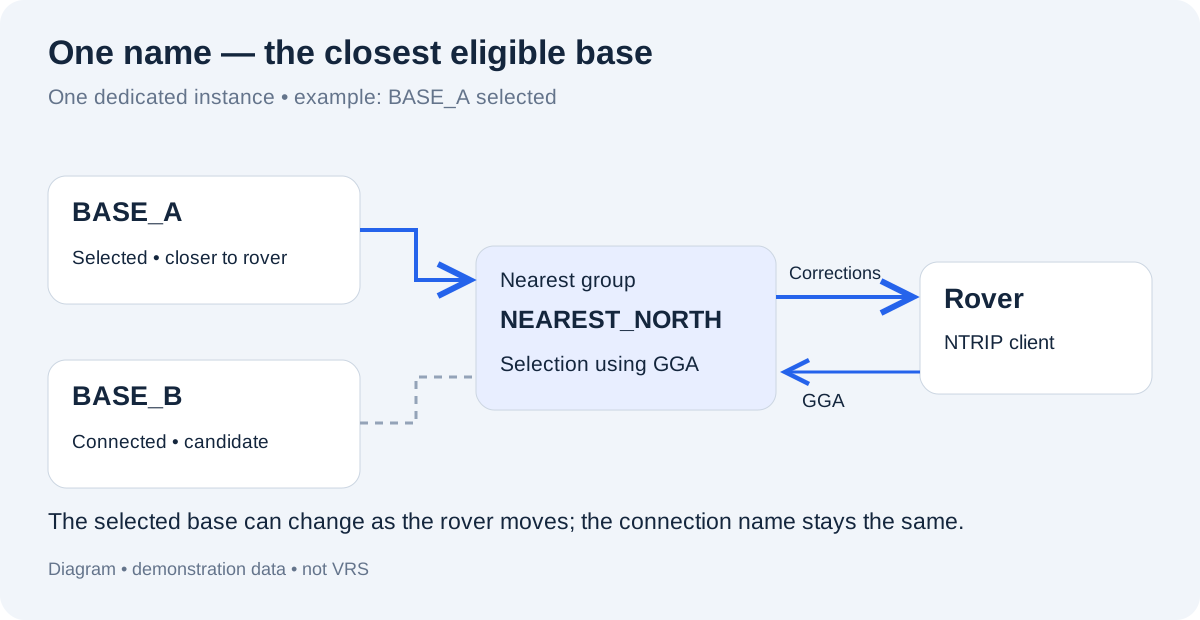
Conceptual example with demonstration names. The selected base depends on the rover's position and eligible connected members.
Before you start
- Use a dedicated instance running YCCaster 2.0.2 or newer. Shared instances do not support nearest groups. The application must have received the instance's runtime version.
- Sign in as an account administrator to manage groups.
- Create the base mount points and NTRIP client credentials under the same account and caster as the instance.
- Connect the bases to this instance and check their coordinates. A group cannot select a base connected only to another instance.
Create a group
- Open Casters → your caster → Instances → your instance → Nearest Base.
- Select Create group.
- Enter Connection name, for example
NEAREST_NORTH, and an optional Description. Start the name with a letter or digit; use letters, digits, dots, underscores or hyphens, up to 100 characters. The name cannot be changed later and must not conflict with a physical mount point name. - In Who can connect?, choose one of the access modes below.
- Select the bases in Member mount points and click Save group.
- Reconnect the affected bases so their next authorization applies the group assignment. Select Refresh to check the result.
A mount point can belong to only one nearest group on the same instance. An empty group can be saved, but it cannot provide corrections. A deleted group's connection name remains reserved.
Choose who can connect
| Mode | Who receives access |
|---|---|
| All NTRIP clients in this account | Eligible NTRIP clients belonging to this account and caster. This is the default. |
| Selected NTRIP clients | Only the credentials selected in Allowed NTRIP clients. An empty selection denies access to everyone. |
These are NTRIP client credentials, not admin users. Both modes still require valid credentials, an eligible account and subscription, an unexpired client and a compatible NTRIP version.
Access to the group permits receiving corrections from every member. Direct mount point permissions do not restrict selection inside the group. Adding a base therefore makes its stream available to all clients allowed to use the group.
Connect a rover
Use the Connection section of the group card:
| Rover setting | Value |
|---|---|
| Host | The instance IP or configured hostname |
| Port | The instance's NTRIP port, for example 2101 |
| Mount point | The exact Connection name, for example NEAREST_NORTH |
| Username / password | An allowed NTRIP client's credentials |
| Send GGA | Enable periodic NMEA GGA messages with the rover's current position |
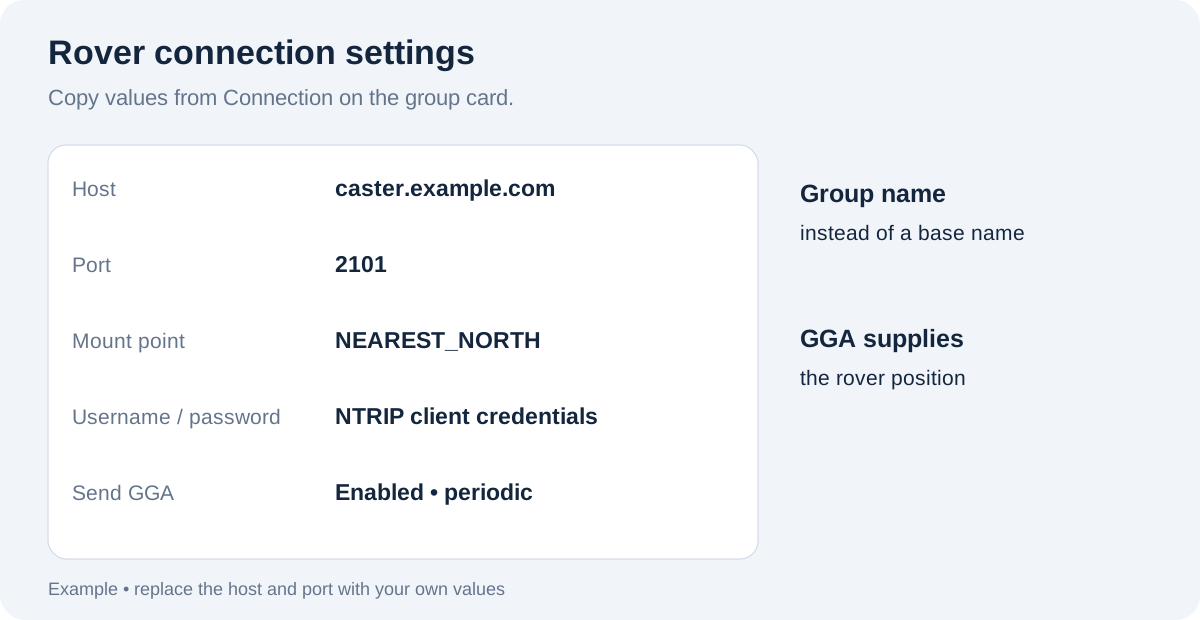
Connection settings are illustrative; copy the actual host, port and name from your group card.
Do not rely on the group appearing in the receiver's source list: enter its exact name manually if needed. Without a usable rover position, the caster cannot select the nearest base. If no connected member has valid coordinates, the group cannot supply corrections.
Check coordinates and readiness
The group table shows Last authorized coordinates, Origin and Observed state. Selection uses the mount point's stream description (STR), with any manual source override applied. The position shown on a Base map is not the source of coordinates for nearest selection.
Origin identifies coordinates reported by the base, entered manually, or a combination of both. Missing or invalid coordinates exclude a base from nearest selection, even if its mount point works directly.
| Observed state | What to do |
|---|---|
| Ready | The last authorization assigned this group and recent telemetry indicates the connection is active. This does not certify RTCM freshness or RTK quality. |
| Coordinates required | Correct the stream coordinates or manual override, then reconnect the base. |
| Reconnect to apply | Reconnect the base to apply its saved group assignment. |
| Offline or no recent telemetry | Check the base connection and instance telemetry, then select Refresh. |
The page does not refresh automatically. The ready count is an observed status, not a guarantee that every listed stream is usable by the rover.
Apply changes and troubleshoot
- Membership or coordinate changes: reconnect all affected bases, including removed members.
- Access changes: apply on the client's next authorization. Existing connections are not disconnected automatically.
- Deleting a group: blocks new connections; existing client connections can continue until closed. Reconnect its bases to remove the old assignment.
For missing corrections, check client access, periodic GGA, base coordinates and connections to this instance. Use instance events and authorizations to investigate failures. See Sessions to inspect base sessions and rover connections; a nearest rover may visit several bases during one connection.
Selection currently has no hysteresis: near the boundary between two bases, small position changes can cause repeated switching. Do not assume an immediate switch when a base disconnects; replacement can depend on the next GGA message. Check the rover's RTK status after a source change.
Mount points
A mount point is where a base station connects and where rovers get correction data. The form includes:
- a mount point name, unique within the caster;
- username and password for the source connection;
- NTRIP version:
Any,v1, orv2; - password encryption;
- an optional user or group that should see the mount point in the field app.
For NTRIP v1, the username may be hidden because the connection format is different. If you save an encrypted password, it cannot be shown again in plain text later.
From the mount point page you can update settings, delete the mount point, configure the source, and manage access.
Select Session history on a mount point page to see its server sessions. Open a session to review traffic, rover connections, and events. See Sessions for details.
Mount point source
The source describes where corrections come from. In most cases it is a base station or an external NTRIP source. Source settings let you update connection details or temporarily override the stream.
That is useful when:
- the base station address or port changes;
- a stream needs to move to another instance;
- the current source is down and you need a backup.
Clients
A client is a set of credentials for a rover, app, or other correction consumer. The form includes:
- owner;
- username and password;
- NTRIP version;
- expiration date;
- password encryption.
The username must be unique within the caster. Leave the expiration empty if the client should not expire automatically.
Clients make field access easier to manage. You can issue one login per rover, then disable or replace that login without touching the rest of the setup.
Renaming and deleting
A caster can be renamed or deleted. Before deleting one, check its instances, mount points, and clients. Deleting a caster affects the whole NTRIP setup behind it, so move or stop active connections first.