
Relay
Receive an external NTRIP stream on your YouCORS instance and share it with your rovers.
Relay
A Pull Relay connects your instance to an upstream NTRIP caster, receives one correction stream and publishes it under a local mount point. Rovers connect to YouCORS using your local client credentials, not the upstream provider's credentials.
Only pull is supported: bringing an external stream into your instance. Relay does not push corrections to another caster, combine streams, generate per-rover VRS corrections, or automatically switch between upstream providers. An enabled relay connects even when no rovers are listening.
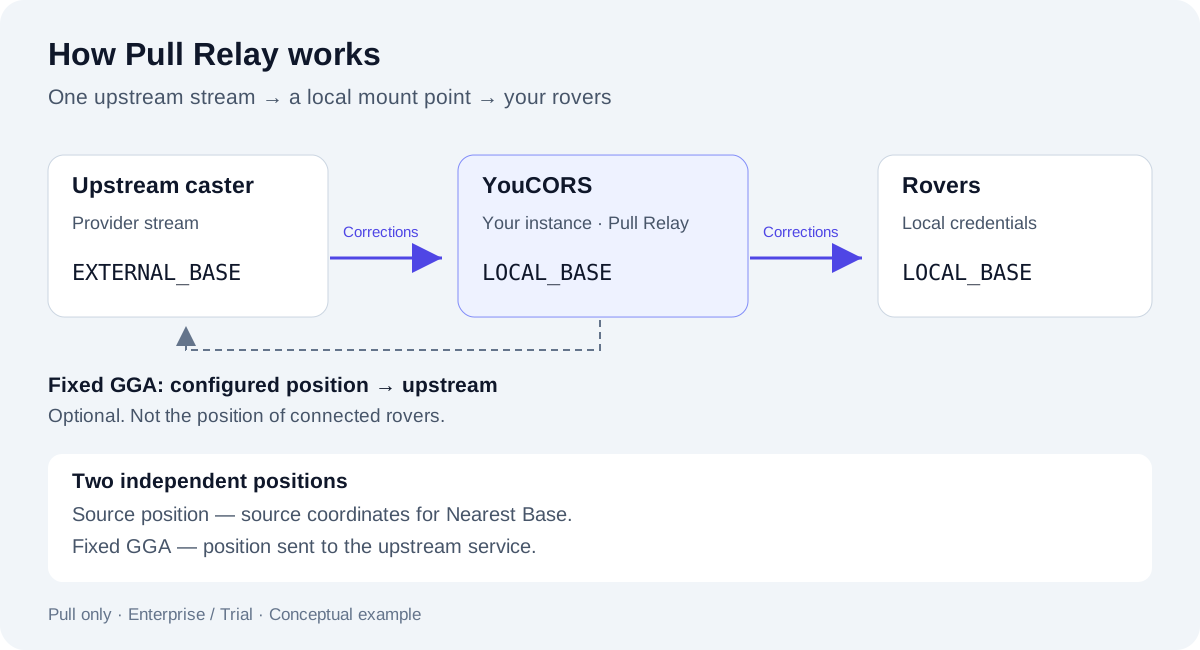
Conceptual example. EXTERNAL_BASE and LOCAL_BASE are demonstration names.
Watch Pull Relay in action
This 45-second walkthrough connects an RTK2go correction stream to a YouCORS caster and shows the relay setup in the dashboard.
Watch the Pull Relay demo on YouTube.
Before you start
- An active Enterprise subscription or Trial. Basic and Pro do not include Relay. There is no separate relay count limit; existing resource and connection limits still apply.
- An account administrator and a dedicated instance running YCCaster 2.1.0 or newer. Shared instances are not supported. The application must have received the runtime version, and the instance must be reachable for management.
- The upstream host, port, mount point, NTRIP version, TLS requirements and credentials. Confirm with the provider that your use and redistribution of its stream are permitted.
- A local mount point on the same caster, plus NTRIP client credentials with access to it. See Casters for mount points and clients.
Open Casters → your caster → Instances → your instance → Relays. If the runtime version is too old or not reported, upgrade the instance and apply its updated configuration.
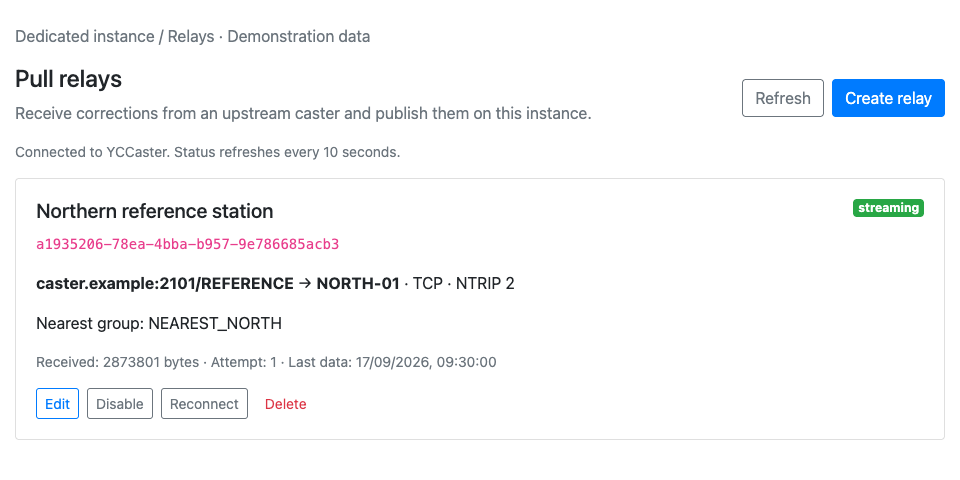
Actual admin component with demonstration data. The UI examples use NORTH-01 as the local name and REFERENCE as the upstream name.
Create a relay
- Select Create relay and enter an optional Name for your team.
- Set Local mount point to the exact name configured on this caster. Do not use a name already occupied by a connected base or another enabled relay.
- Enter the Upstream caster settings below.
- Set the real source coordinates under Source position and nearest group, particularly if you will use Nearest Base. Optionally select an existing group on this instance.
- Configure Fixed GGA only if the upstream needs a position.
- Check Enabled to connect automatically, then select Save relay. Leave it unchecked to save without connecting.
- Wait for streaming, then confirm that Received increases and Last data updates. Finally, connect a rover and verify correction reception and its RTK status.
Saving is not a connection test. Upstream authentication and reception happen afterward. Incorrect new credentials are not automatically rolled back.
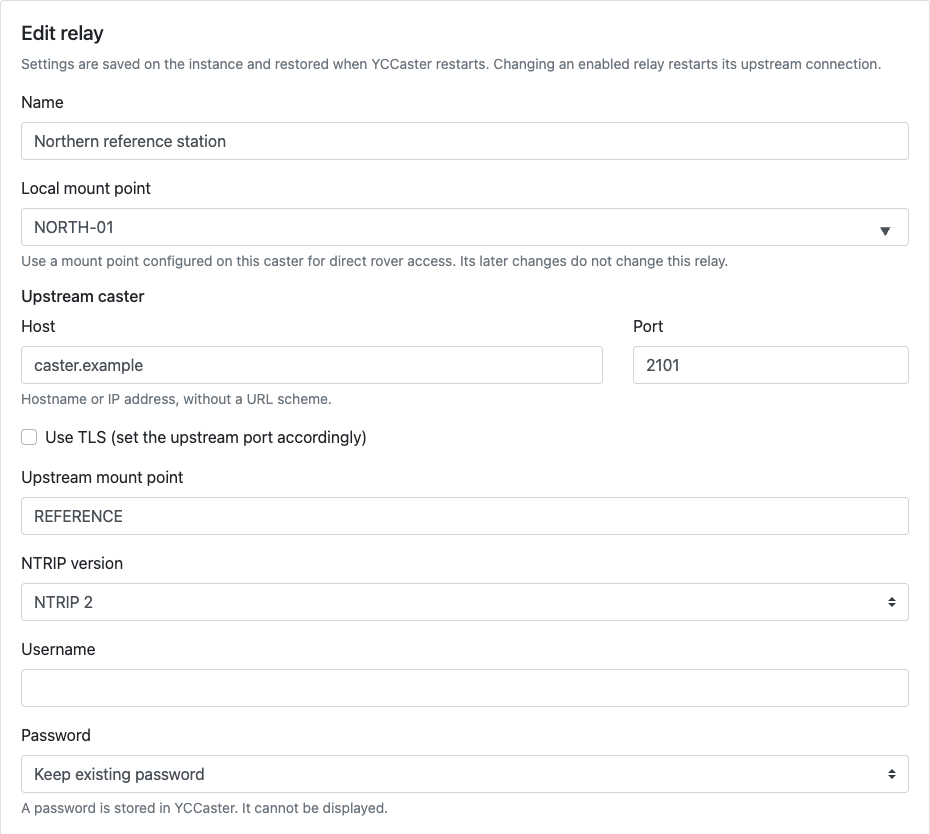
Actual edit form with demonstration values. Use your provider's settings, not these examples.
| Setting | What to enter |
|---|---|
| Host | Hostname or IP only, such as caster.example.com; no https://, path or port. |
| Port | The provider's NTRIP port. The form starts at 2101; enabling TLS does not change it automatically. |
| Use TLS | Enable when required by the provider and set the matching port. Certificate and hostname verification must succeed. |
| Upstream mount point | Exact external stream name, without a leading /. This can differ from the local name. |
| NTRIP version | NTRIP 1 or NTRIP 2, as supported by the provider. |
| Username / Password | Upstream credentials, separate from local rover credentials. Choose Set new password to enter one. |
Mount point and group fields accept ASCII letters, digits, dots, underscores, hyphens and ~. Host redirects are not followed. Do not point a relay back to the same instance or create a chain that loops through other casters.
When editing, Keep existing password preserves the stored secret, Set new password replaces it, and Clear password removes it. The stored password cannot be displayed in the panel.
Source coordinates and Nearest Base
Source position describes the correction source, not the rover. Enter its actual latitude and longitude in decimal degrees. The form initially contains zeroes: these are valid coordinates, not an “unknown position” marker. Do not leave them as placeholders.
Nearest group is optional. Choose an existing group on this instance if you want the relay source to participate in nearest-base selection. Every client allowed to use that group may receive this source. See Nearest Base groups.
Relay coordinates and group membership are stored in the relay itself. Later changes on the Nearest Base or mount point pages do not update the relay: edit it here too. The Source table description section lets you describe the stream's format and metadata; it does not convert or validate the correction data.
Fixed GGA: a separate upstream position
Some upstream services require NMEA GGA. Enable Send a fixed position to the upstream caster and supply the position requested by your provider. YCCaster sends it after the upstream accepts the NTRIP connection and then at the configured interval.
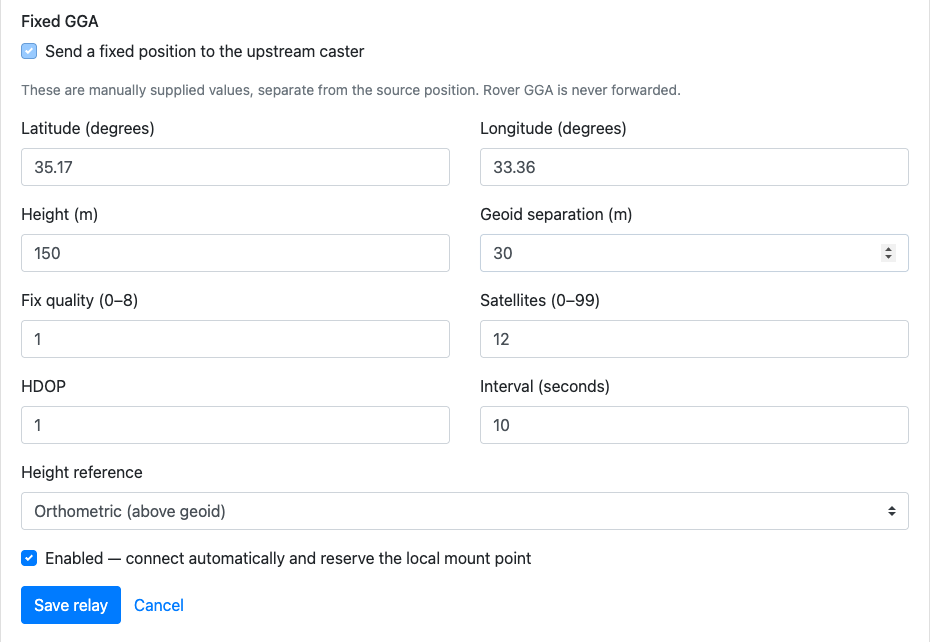
Demonstration values, not receiver measurements or recommended settings for a real site.
| Field | Meaning |
|---|---|
| Latitude / Longitude | Fixed upstream position in decimal degrees; independent of source coordinates. |
| Height / Geoid separation | Values in metres. |
| Height reference | Orthometric sends Height as altitude. Ellipsoidal sends altitude = Height − Geoid separation. |
| Fix quality / Satellites / HDOP | Manually supplied values, not live GNSS observations. Use values appropriate to the upstream. |
| Interval | 1–3600 seconds; the form defaults to 10 seconds. |
Rover GGA is never forwarded upstream. All rovers receive the same relayed stream. This is not a per-rover VRS service. If the provider generates a position-dependent stream, verify its suitability for your operating area. The GGA sent and Last sent counters show sends, not confirmation that the provider used the position.
Connect rovers and check status
Configure a rover with your instance host, its NTRIP port, the local mount point and an authorized local NTRIP client's username/password. Do not enter the upstream host or upstream credentials. For a Nearest Base connection, use the group name and enable periodic rover GGA as described in the group guide.
The panel refreshes status every 10 seconds. Refresh requests a fresh snapshot; if YCCaster is unavailable, displayed values may be stale.
| Status | Meaning |
|---|---|
| disabled | Saved but not connecting. |
| starting / connecting | Starting or attempting an upstream connection. |
| connected | Upstream accepted the request; correction bytes may not have arrived yet. |
| streaming | Bytes are being published locally. This does not validate RTCM or guarantee an RTK fix. |
| disconnected / retrying | Connection ended or failed; check the error and retry time. |
| stopped | This relay run has stopped. |
Retries use increasing delays, up to about 30 seconds plus jitter. No incoming data for 30 seconds also triggers reconnection. A brief interruption may be transparent to connected rovers, but their no-data timeout can close the connection if delivery does not resume. Historical Last data alone does not prove the source is currently available.
Edit, disable, reconnect or delete
- Edit: changing an enabled relay restarts its upstream connection and can interrupt corrections.
- Disable: stops the relay, keeps its settings and releases its local mount point reservation.
- Enable: connects automatically and reserves the local name, including while retrying. A direct base cannot use that reserved name.
- Reconnect: restarts an enabled relay without changing its saved settings.
- Delete: stops the relay and removes its saved configuration and upstream credentials. Rovers lose that source; upgrading later does not restore it.
Settings are stored on the instance and restored when YCCaster restarts. Protect server access and backups: the relay configuration contains upstream credentials.
Plans and downgrade
Enterprise and Trial include Relay; Basic and Pro do not. Switching to Basic or Pro schedules deletion of saved relays and upstream credentials, not suspension. If an instance is offline, cleanup waits until it is reachable; a relay can briefly start again before cleanup completes. The panel shows a cleanup warning while deletion is pending.
Trial expiry by itself shuts down the server without this extra deletion. Buying Basic or Pro afterward triggers cleanup. Do not rely on a later upgrade to recover a deleted relay.
Troubleshooting
| Symptom or error | Check |
|---|---|
| Locked feature or unavailable controls | Enterprise/Trial access, administrator role, dedicated instance, reported YCCaster version and management connectivity. |
unauthorized / mountpoint_not_found | Upstream credentials, exact stream name and provider access. |
dns_error / connection_refused / connect_timeout | Host, port, network reachability and provider availability. |
tls_error | TLS setting, port, certificate and hostname. |
first_data_timeout / read_timeout | Upstream may accept connections without sending data. Check the stream and any required Fixed GGA. |
gga_write_error | Sending GGA failed; check the upstream connection and requirements. |
source_limit | Existing source connection limits; an established relay uses a source slot. |
local_mountpoint_conflict / relay_loop | An occupied local name or connection back to this caster. Use a free name and an independent upstream. |
| No response after Save/Delete | Select Refresh and inspect the result before repeating the operation; it may already have succeeded. |
| Streaming but no RTK fix | Rover compatibility, correction age, coverage and actual source position. Streaming only confirms byte delivery. |
Use instance events and Sessions to investigate the connection path. Do not share upstream passwords in screenshots or support requests.